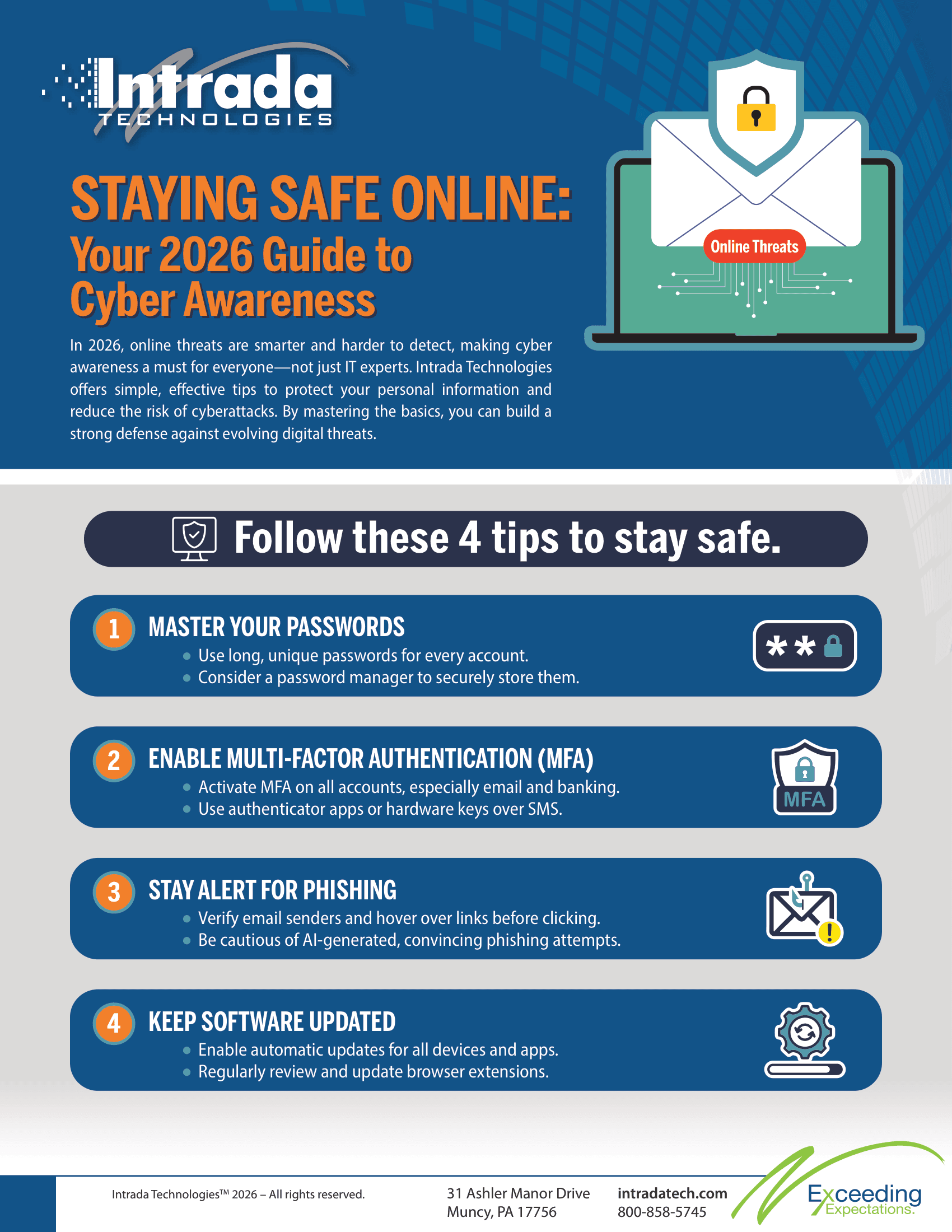
Staying Safe Online: Your 2026 Guide to Cyber Awareness
Overview
Cyber threats are smarter than ever, making online security a daily priority for everyone. This article breaks down simple, effective habits—like strong passwords, multi-factor authentication, and staying alert for phishing—that can protect your personal information. Ready to boost your cyber awareness? Read the full guide to safeguard your digital life.
In today's digital world, staying safe online isn't just for IT experts anymore—it's something we all need to think about. As we move through 2026, online threats are becoming smarter and more difficult to spot. This means being aware of online risks is a continuous effort, not a one-time task.
This article is designed to be a simple guide to the basic habits that can help protect your personal information. While technology offers many tools for security, your own awareness is one of the most effective parts of staying safe online. By keeping these key points in mind, you can greatly lower your chances of being affected by a cyberattack.
Essential Practices for a Secure 2026
Building a strong defense starts with the basics. Often, attackers take advantage of simple oversights rather than complex vulnerabilities. Here are actionable steps you can take to maintain a high level of cyber awareness this year.
Master Your Passwords
Passwords are the first line of defense for most accounts, yet they are often the weakest link.
Length Matters: Create long passwords. A phrase or sentence is often stronger than a complex short word.
Unique for Every Account: Never reuse passwords. If one site is compromised, you do not want that same key to unlock your email or bank account.
Use a Password Manager: It is impossible to remember unique, complex passwords for every service. A password manager stores them securely, so you only need to remember one master key.
Enable Multi-Factor Authentication
Multi-Factor Authentication (MFA) is a security enhancement that requires users to verify their identity using multiple credentials before gaining access to a system, application, or service. This layered approach to security helps ensure that the person requesting access is indeed who they claim to be, significantly reducing the risk of unauthorized access.
MFA generally involves a combination of two or more of the following factors:
Something you know: A password, PIN, or answer to a security question.
Something you have: A physical token, smart card, or a mobile phone to receive a verification code.
Something you are: Biometric identifiers, such as a fingerprint, facial recognition, or voice, that uniquely identify the user.
By requiring multiple forms of verification, MFA adds an additional layer of defense against potential threats, even if one factor (such as a password) becomes compromised. For instance, even if an attacker obtains a user's password, they would still need the second form of authentication to gain access.
In today's digital landscape, where cyber threats are increasingly sophisticated, implementing MFA is a critical step for organizations to protect sensitive data and systems. It enhances security for end-users and across the enterprise, making it a fundamental component of a robust cybersecurity strategy.
(MFA
Multi-Factor Authentication (MFA) is a security enhancement that requires users to verify their identity using multiple credentials before gaining access to a system, application, or service. This layered approach to security helps ensure that the person requesting access is indeed who they claim to be, significantly reducing the risk of unauthorized access.
MFA generally involves a combination of two or more of the following factors:
Something you know: A password, PIN, or answer to a security question.
Something you have: A physical token, smart card, or a mobile phone to receive a verification code.
Something you are: Biometric identifiers, such as a fingerprint, facial recognition, or voice, that uniquely identify the user.
By requiring multiple forms of verification, MFA adds an additional layer of defense against potential threats, even if one factor (such as a password) becomes compromised. For instance, even if an attacker obtains a user's password, they would still need the second form of authentication to gain access.
In today's digital landscape, where cyber threats are increasingly sophisticated, implementing MFA is a critical step for organizations to protect sensitive data and systems. It enhances security for end-users and across the enterprise, making it a fundamental component of a robust cybersecurity strategy.
)
Relying solely on a password is risky. Multi-Factor Authentication
Multi-Factor Authentication (MFA) is a security enhancement that requires users to verify their identity using multiple credentials before gaining access to a system, application, or service. This layered approach to security helps ensure that the person requesting access is indeed who they claim to be, significantly reducing the risk of unauthorized access.
MFA generally involves a combination of two or more of the following factors:
Something you know: A password, PIN, or answer to a security question.
Something you have: A physical token, smart card, or a mobile phone to receive a verification code.
Something you are: Biometric identifiers, such as a fingerprint, facial recognition, or voice, that uniquely identify the user.
By requiring multiple forms of verification, MFA adds an additional layer of defense against potential threats, even if one factor (such as a password) becomes compromised. For instance, even if an attacker obtains a user's password, they would still need the second form of authentication to gain access.
In today's digital landscape, where cyber threats are increasingly sophisticated, implementing MFA is a critical step for organizations to protect sensitive data and systems. It enhances security for end-users and across the enterprise, making it a fundamental component of a robust cybersecurity strategy.
adds a second layer of verification, making it much harder for unauthorized users to access your accounts.
Turn it On Everywhere: Enable MFA
Multi-Factor Authentication (MFA) is a security enhancement that requires users to verify their identity using multiple credentials before gaining access to a system, application, or service. This layered approach to security helps ensure that the person requesting access is indeed who they claim to be, significantly reducing the risk of unauthorized access.
MFA generally involves a combination of two or more of the following factors:
Something you know: A password, PIN, or answer to a security question.
Something you have: A physical token, smart card, or a mobile phone to receive a verification code.
Something you are: Biometric identifiers, such as a fingerprint, facial recognition, or voice, that uniquely identify the user.
By requiring multiple forms of verification, MFA adds an additional layer of defense against potential threats, even if one factor (such as a password) becomes compromised. For instance, even if an attacker obtains a user's password, they would still need the second form of authentication to gain access.
In today's digital landscape, where cyber threats are increasingly sophisticated, implementing MFA is a critical step for organizations to protect sensitive data and systems. It enhances security for end-users and across the enterprise, making it a fundamental component of a robust cybersecurity strategy.
on email, banking, social media, and any business applications that support it.
Prefer Apps over SMS: Authenticator apps or hardware keys are generally more secure than receiving codes via text message, which can sometimes be intercepted.
Don't Approve Unknown Requests: If you receive an MFA
Multi-Factor Authentication (MFA) is a security enhancement that requires users to verify their identity using multiple credentials before gaining access to a system, application, or service. This layered approach to security helps ensure that the person requesting access is indeed who they claim to be, significantly reducing the risk of unauthorized access.
MFA generally involves a combination of two or more of the following factors:
Something you know: A password, PIN, or answer to a security question.
Something you have: A physical token, smart card, or a mobile phone to receive a verification code.
Something you are: Biometric identifiers, such as a fingerprint, facial recognition, or voice, that uniquely identify the user.
By requiring multiple forms of verification, MFA adds an additional layer of defense against potential threats, even if one factor (such as a password) becomes compromised. For instance, even if an attacker obtains a user's password, they would still need the second form of authentication to gain access.
In today's digital landscape, where cyber threats are increasingly sophisticated, implementing MFA is a critical step for organizations to protect sensitive data and systems. It enhances security for end-users and across the enterprise, making it a fundamental component of a robust cybersecurity strategy.
prompt you didn't trigger, deny it immediately and report it to your IT team.
Stay Alert for Phishing
Phishing remains one of the most common methods attackers use to steal credentials or install malware. The tactics have moved beyond poorly spelled emails to highly convincing impersonations.
Verify the Sender: Check the actual email address, not just the display name. Attackers often use addresses that look similar to legitimate ones but have slight misspellings.
Think Before You Click: Hover over links to see the actual URL destination before clicking. If an email creates a sense of urgency or fear, take a moment to verify the request through a separate channel.
Watch for AI
Artificial Intelligence (AI) refers to the simulation of human intelligence processes by machines, particularly computer systems. In the IT and digital marketing industry, AI is transforming the way businesses operate by enabling machines to analyze data, learn patterns, and make decisions with minimal human intervention. AI is widely used in chatbots, personalized marketing campaigns, predictive analytics, and customer behavior analysis. It helps optimize ad performance, improve user experiences, and target the right audience with precise data-driven insights. From automating repetitive tasks to delivering actionable marketing strategies, AI has become a critical tool for innovation and efficiency in the digital landscape.
-Generated Attacks: Be aware that attackers now use AI
Artificial Intelligence (AI) refers to the simulation of human intelligence processes by machines, particularly computer systems. In the IT and digital marketing industry, AI is transforming the way businesses operate by enabling machines to analyze data, learn patterns, and make decisions with minimal human intervention. AI is widely used in chatbots, personalized marketing campaigns, predictive analytics, and customer behavior analysis. It helps optimize ad performance, improve user experiences, and target the right audience with precise data-driven insights. From automating repetitive tasks to delivering actionable marketing strategies, AI has become a critical tool for innovation and efficiency in the digital landscape.
to write perfect emails without grammatical errors, making them harder to spot. Context is key—if a request seems unusual for that person, verify it.
Keep Software Updated
Software updates often contain critical security patches that address known vulnerabilities. Delaying these updates leaves a door open for attackers.
Enable Automatic Updates: whenever possible, set your operating system and applications to update automatically.
Don't Ignore Browser Extensions: Outdated browser plugins can be a significant security risk. Review and update them regularly, and remove any you no longer use.
Update All Devices: Remember that mobile phones, tablets, and even smart devices (IoT
The Internet of Things (IoT) refers to the interconnected network of physical devices, vehicles, appliances, and other objects equipped with sensors, software, and network connectivity that enable them to collect and exchange data. This ecosystem allows devices to communicate with each other and with centralized systems, creating a seamless flow of information and enhancing automation and efficiency across various applications. IoT technology spans a diverse range of sectors, including smart homes, healthcare, manufacturing, agriculture, and transportation. By leveraging IoT, organizations can monitor systems in real-time, optimize performance, predict maintenance needs, and develop new business models. The proliferation of IoT devices has led to significant advancements in connectivity and data analytics, driving innovation and transforming the way we interact with the world around us. As IoT continues to evolve, issues related to security, data privacy, and interoperability become paramount, requiring ongoing research and development to address and mitigate potential challenges.
) need updates just as much as your laptop or server.
Partnering for Better Security
Maintaining cyber awareness is a team effort. It requires vigilance from every individual and a supportive framework from the organization. For over 24 years, we have built upon the realization that great service—and great security—does not magically appear. It must be purposefully designed into our practices and policies every single day.
We view ourselves as the creation or expansion of your IT team. We work directly with our clients to create a partnership that addresses their specific security needs. If you are looking to strengthen your defenses and build a culture of cyber awareness within your organization, we invite you to explore Intrada's IT services. Let's work together to protect what matters most to your business.
David Steele is the co-founder of Intrada Technologies, a full-service web development and network management company launched in 2000. David is responsible for developing and managing client and vendor relationships with a focus on delivering quality service. In addition, he provides project management oversight on all security, compliancy, strategy, development and network services.
In our increasingly connected world, cybersecurity has become a fundamental aspect of running a successful business. A single data breach can lead to significant financial loss, damage to your reputation, and a loss of customer confidence. While technology provides powerful tools to defend against t...
Memory prices in 2026 jumped over 90% in Q1, with another 20% increase expected for Q2. This is largely driven by overwhelming demand from AI data centers, pushing manufacturers to shift production toward high-bandwidth and server memory and away from standard modules. The result: record-high hardwa...