

Most of a website’s attention goes to the part people can see. Underneath sits a layer of infrastructure that makes the visible part work, and it keeps its own calendar:The security certificate, which produces the padlock in the address barThe programming language version, which runs the site’s code...
Why a 'Strong' Password Doesn't Mean What You Think
Information Technologies | David Steele | Thursday, October 29, 2026
Overview
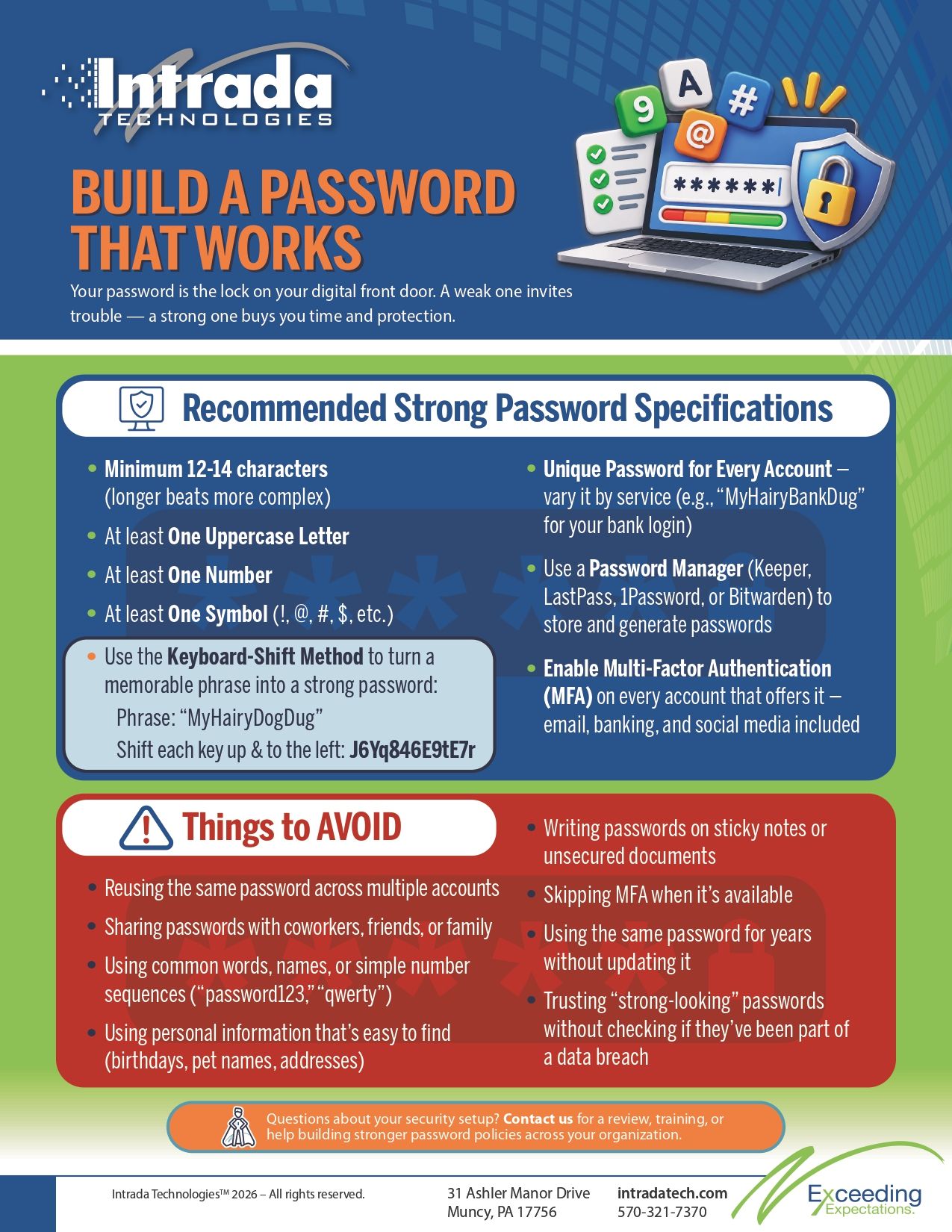
A strong password combines length, complexity, and unpredictability — but true password strength also depends on uniqueness across accounts and protection through tools like password managers and multi-factor authentication. The keyboard-shift method (turning a memorable phrase like "MyHairyDogDug" into "J6Yq846E9tE7r") lets you create passwords that are both hard to crack and easy to recall, without resorting to random strings you'll inevitably forget.
Most people think of a strong password the way they think of a strong lock: something that simply keeps intruders out. But a lock is only as good as the door it's attached to, the frame holding it, and the habits of the person who owns the house. Leave a spare key under the mat, use the same lock on every door in the neighborhood, or install a flimsy frame, and the strongest deadbolt in the world won't save you.
Passwords work the same way. You can create a 20-character password packed with symbols and still get breached — not because the password itself was weak, but because it was reused on five other sites, stored in a sticky note, or handed over through a convincing phishing email. Password strength isn't just about complexity. It's about the entire system surrounding how that password is created, remembered, and protected.
This article breaks down what makes a password resistant to modern hacking techniques, why "super strong" passwords often backfire, and how to build passwords you'll remember — along with the broader habits (password managers, multi-factor authentication, and unique credentials per account) that turn a single strong password into a genuinely secure one.

Where Is Your Front Door? Who Hackers Target
Before diving into password mechanics, it helps to understand who's on the other side of that door. Cybercriminals don't target people randomly. They target industries, business sizes, and locations where the payoff is high and the defenses are low.
Small and mid-sized businesses are frequent targets precisely because they often assume they're too small to matter. Healthcare organizations, financial services firms, legal practices, and manufacturers handling sensitive client data are especially attractive, since stolen records in these sectors carry high resale value on dark web marketplaces. Remote and hybrid workforces have also expanded the "front door" dramatically — every employee's home network, personal device, and cloud login is now a potential entry point.
In other words, your front door isn't just your office building. It's every account, every device, and every employee credential connected to your organization. Hackers don't need to break down the strongest door in the building if there's an unlocked window around back.

How Hackers Target Passwords
Password cracking has evolved far beyond a person manually guessing combinations. Today's hacking industry relies on automated, large-scale methods designed to test millions of password combinations in minutes.
Brute-force attacks systematically try every possible character combination until one works. Dictionary attacks take a shortcut by testing common words, names, and known password lists rather than random characters, since so many people default to predictable choices. Credential stuffing uses passwords leaked from one breach to attempt logins on other platforms, which is exactly why password reuse is so dangerous. Phishing bypasses cracking entirely by tricking someone into handing over their password directly.
The tools behind these methods have gotten faster and cheaper. Specialized cracking software run on modern hardware can test billions of password guesses per second. What once took a hacker years to crack can now take seconds, which is why the numbers behind password strength matter more than ever.
Password Strength by the Numbers: Why Character Count and Complexity Matter
The mathematics of password cracking come down to one concept: the more possible combinations a password could be, the longer it takes a computer to guess it correctly.
A short, simple password made up of lowercase letters only has a relatively small pool of possible combinations, which modern cracking tools can exhaust almost instantly. Add uppercase letters, numbers, and symbols, and that pool expands exponentially. Add length on top of that, and the time required to crack a password can stretch from seconds to years — or centuries.
Here's the pattern worth remembering: length matters more than almost anything else. An eight-character password with symbols and numbers can still be cracked relatively quickly by modern hardware, while a twelve-to-sixteen-character password — even without obscure symbols — can take dramatically longer to break simply because of how many more combinations exist. Complexity helps, but length is the force multiplier.
This is why security experts have shifted away from recommending short, symbol-heavy passwords and toward longer passphrases. Choose length and unpredictability together if cracking resistance matters more than convenience — which, for most business accounts, it should.
The Problem with "Super Strong" Passwords
If length and complexity are so effective, why not just generate a random 20-character string of letters, numbers, and symbols for every account?
Because nobody can remember them. Computer-generated passwords like "xQ7!mR2vL9#pZ4t" are excellent at resisting brute-force attacks and nearly impossible for a human brain to retain. The result of this is that people write them down on sticky notes, save them in unprotected text files, or reuse the one random password they did manage to memorize across every account they own.
A password that's theoretically unbreakable but practically unusable isn't secure — it just moves the vulnerability somewhere else. The goal isn't maximum randomness. The goal is maximum resistance to cracking combined with a method a person can realistically use every day.
Our Recommendation: A Strong Password You Can Remember
A better approach combines a memorable phrase with a simple transformation technique, giving you something that looks random to a computer but makes sense to you.
Step 1: Identify Your Requirements
Every system has different password rules — minimum length, required capitals, numbers, or symbols. Check the specific requirements for the account or system you're securing before building your password, since the technique below can be adjusted to fit almost any rule set.
Step 2: Use the Keyboard-Shift Method
Start with a phrase that means something to you but nothing to anyone else — not your pet's actual name next to your actual birth year, but something more abstract. For example: "MyHairyDogDug".
Now shift each letter one key up and to the left on a standard QWERTY keyboard. That simple phrase transforms into something that looks like this:
J6Yq846E9tE7r
Notice what happened: letters became a mix of letters, numbers, and symbols that would take a cracking tool far longer to guess, yet you can reconstruct it anytime just by remembering the original phrase and the shift pattern. The phrase is memorable. The output is not.
Step 3: Get Creative Based on Your Specific Requirements
If a system requires a symbol and your shifted password doesn't naturally include one, add a symbol at a consistent spot — the end, the beginning, or between two words in your original phrase. The method is flexible enough to meet almost any password policy while still producing something memorable.
A Warning About Using Familiar Phrases
Be careful about which phrases you choose as your base. Avoid anything tied to publicly available information — pet names posted on social media, anniversaries, or your street address. This matters more than it might seem: according to the Identity Theft Resource Center's 2023 Annual Data Breach Report, over 353 million Americans were affected by data compromises in 2023 alone. With that much personal information already circulating from past breaches, phrases built on easily discoverable facts are far riskier than they used to be. Choose a base phrase that's meaningful to you but not something a quick search — or a leaked database — could reveal.
Don't Use the Same Password Everywhere
Even a well-constructed password loses its value if it's reused across every account. Credential stuffing attacks rely entirely on this habit — once one site is breached, hackers test those same credentials everywhere else.
The keyboard-shift method solves this problem neatly. Build the service name into your base phrase before shifting it. "MyHairyDogDug" becomes "MyHairyBankDug" for your banking login, "MyHairyEmailDug" for email, and so on. Each resulting password is unique, but you only need to remember one system to recreate all of them.
Password Managers: Letting Technology Carry the Load
For organizations managing dozens or hundreds of credentials across employees, even a clever memorization system has limits. This is where password managers come in — tools that generate, store, and autofill complex, unique passwords for every account, so employees don't have to remember them individually.
Several platforms are consistently recommended by security professionals for business use:
- Keeper — known for strong encryption architecture and business-focused administrative controls, including activity reporting and role-based access.
- LastPass — a widely adopted option offering cross-device syncing and team-sharing features suited to small and mid-sized businesses.
- 1Password — recognized for its user-friendly interface and strong security audit history, with dedicated business and team plans.
- Dashlane — offers built-in dark web monitoring alongside password generation and storage, alerting users when their credentials appear in known breaches.
A password manager doesn't just store passwords — it removes the human bottleneck that forces people toward reused or weak credentials in the first place. For a business trying to build sustainable password hygiene across an entire staff, a password manager shifts the burden from memory to infrastructure.
Enable
Multi-Factor Authentication
Everywhere You Can
Apply
Building a More Secure Environment Starts with a Conversation
Strong passwords are an essential piece of a security strategy, but they work best as part of a broader approach — one that includes employee training, regular security reviews, and clear processes for how credentials are created, stored, and shared across your organization.
If you're ready to strengthen your organization's security posture, reach out to our team. We partner with businesses to deliver cybersecurity training, conduct security reviews, and help build the processes and procedures that support a genuinely secure environment — tailored to how your team works.
Frequently Asked Questions
What makes a password hard for hackers to crack?
Length is the single biggest factor in password strength, followed by the use of varied character types — uppercase, lowercase, numbers, and symbols. A longer password with moderate complexity generally resists cracking tools better than a short password packed with symbols.
Why shouldn't I use the same password for multiple accounts?
Reusing passwords makes you vulnerable to credential stuffing, where hackers take login details leaked from one breached site and test them against other platforms. If one account is compromised, every account sharing that password becomes vulnerable too.
Are computer-generated random passwords better than memorable ones?
Random passwords are highly resistant to cracking, but they're difficult to remember, which often leads people to write them down or reuse them elsewhere, undermining their security benefit. A memorable method like the keyboard-shift technique offers a practical middle ground: strong resistance to cracking with a format you can recall.
Is a password manager worth it for a small business?
For organizations managing multiple employee logins, a password manager reduces reliance on memory and encourages unique, complex passwords across every account. Options like Keeper, LastPass, 1Password, and Dashlane are commonly recommended for their business-focused features and encryption standards.
Does
Multi-Factor Authentication
really make a difference if my password is strong?
Yes. Even a well-constructed password can be exposed through phishing, breaches, or social engineering.

ABOUT THE AUTHOR
David Steele is the co-founder of Intrada Technologies, a full-service web development and network management company launched in 2000. David is responsible for developing and managing client and vendor relationships with a focus on delivering quality service. In addition, he provides project management oversight on all security, compliancy, strategy, development and network services.
Learn MoreMost people think of downtime in terms of lost revenue. That cost is real, but it's only the most visible one. Many of the other costs are harder to see.When systems go down, the costs can include:Lost productivity as employees wait for systems to returnNo access to files or applications your team r...