

Supply chains continue to shift constantly. Prices for essential components fluctuate almost daily. If your business needs new workstations or servers, you likely feel the pinch of recent hardware price increases and memory shortages. These market challenges complicate your budgeting process. They a...
Cyber-Awareness: Spotting Sneaky Email Scams
Information Technologies | David Steele | Tuesday, March 31, 2026
Overview
This article emphasizes the importance of training staff to recognize and prevent email scams, highlighting key areas to scrutinize, such as sender details, subject lines, and hidden links. By fostering a culture of good computer use and providing ongoing education, businesses can strengthen their cybersecurity defenses and reduce the risk of breaches.

The familiar chime of a new email arriving in your inbox happens dozens of times a day. Most of these messages contain harmless questions from colleagues or updates from reliable vendors. However, hidden among those standard communications are sophisticated traps set by scammers. A single misplaced click can compromise an entire company network.
We want to help you train your staff on good computer use and show everyone exactly how to identify malicious emails. We will break down specific areas of an email you should check, including the "From" and "To" fields, subject lines, signatures, and hidden links.
Building a Culture of Good Computer Use

Security starts long before a suspicious email lands in your inbox. It begins with establishing a strong foundation of good computer use across your entire organization. Staff members need to understand that their daily habits directly impact the safety of company data.
Technology is not the solution but the tool used to find the solution. Firewalls and spam filters offer a layer of protection, but they cannot catch every single threat. Human awareness remains your strongest defense. Encourage your team to lock their computer screens whenever they walk away from their desks. Have them use strong, unique passwords for different accounts, and urge them to report anything that looks unusual to your technical support team.
When your staff feels confident identifying threats, your overall security posture improves dramatically. Training should happen regularly, not just during the onboarding process. Scammers constantly change their methods, so your team needs continuous education to stay ahead of the latest tricks.
Breaking Down a Suspicious Email
Scammers rely on you moving quickly. They hope you will glance at an email and react before thinking it through. To combat this, you need to slow down and inspect the details. Here are the specific areas of an email you should check every time you receive an unexpected message.
Check the From and To Fields
The "From" name on an email is incredibly easy to fake. A scammer can change their display name to look exactly like your boss, your bank, or a trusted vendor. Never trust the display name alone. Look closely at the "To" field as well. If you receive an email claiming your specific account is compromised, but the "To" field is blank or lists dozens of alphabetical email addresses, you are likely looking at a mass spam message.
Verify the Actual Email Address
Since the display name is easily faked, you must inspect the actual email address hiding behind it. Click or hover over the sender's name to reveal the full address. Scammers often use free email services like Gmail or Yahoo to send official-looking messages. A legitimate message from Microsoft will not come from "microsoft-support-team@gmail.com."
Also, watch for slight misspellings in the domain name. A scammer might buy a domain that looks almost identical to your company’s domain. If your company website is "example.com," the scammer might send an email from "hr@exampIe.com," using a capital "I" instead of a lowercase "l." These tiny visual tricks are designed to slip past a quick glance.
Analyze the Subject Line
Subject lines in phishing emails usually rely on extreme emotion. They want to trigger panic or greed. Watch out for subject lines that use all capital letters, multiple exclamation points, or words like "URGENT," "IMMEDIATE ACTION REQUIRED," or "FINAL NOTICE."
If an email subject line makes you feel anxious, take a deep breath. Scammers use this false sense of urgency so you will click a link without verifying the sender. Legitimate organizations rarely demand immediate action through an unannounced email.
Scrutinize the Email Signature
A professional email signature usually contains a company logo, a job title, and contact information. Scammers often copy these signatures to make their fake emails look authentic. However, they frequently make mistakes.
Look for blurry or stretched logos, which suggest the image was copied and pasted from a website. Check the job title to see if it makes sense for the request being asked. If a "Marketing Coordinator" emails you demanding an immediate wire transfer for an unpaid invoice, that mismatch should raise a massive red flag.
Sneaky Tactics You Need to Know
Beyond the basic structure of an email, modern scammers use specific psychological and technical tricks to steal your information. Here are two of the most common tactics you need to watch for.
Phone Number Tricks
Not all email scams try to make you click a link. Some use a tactic called "callback phishing." You might receive an email claiming you were just charged $800 for a software subscription. The email contains no links, but it prominently displays a customer service phone number you can call if you want to dispute the charge.
When you call that number out of panic, you reach a call center run by scammers. The fake representative will then try to trick you into handing over your credit card details or giving them remote access to your computer. Never call a phone number provided in a suspicious email. Instead, open your web browser, go to the company's official website, and find their legitimate customer support number.
Website URL Tricks
Links remain the most dangerous part of any phishing email. A button that says "Click Here to Reset Password" can hide a malicious website address. Before you ever click a link, hover your mouse cursor over it. A small box will appear showing you exactly where that link goes.
Look at the URL carefully. Scammers use complex strings of characters or completely unrelated websites to host their fake login pages. They might also use subdomains to trick you. For example, "login.microsoft.scamwebsite.com" is not a Microsoft website; it is a page hosted on "scamwebsite.com." If the URL looks overly complicated or does not match the company you expect, do not click it.
A Partnership for Better Security
Navigating the landscape of cybersecurity takes time and focus. Managing these threats while running your daily operations can quickly become overwhelming. We work directly with each of our clients to create a partnership. Consider us the creation or expansion of your IT or Marketing Teams.
Our goal is to help you build resilient systems and educate your staff effectively. For over 25 years we have built upon the realization that great customer service does not magically appear; it must be refreshed daily. It must be purposefully designed into our practices and policies, and, more importantly, it is an essential component of the nature of our staff. We apply this dedication to helping you protect your network from emerging threats.
Next Steps for Your Business
Training your staff to recognize email scams significantly reduces your risk of a security breach. Take time this week to review these concepts with your team. Show them examples of phishing emails and practice hovering over links.
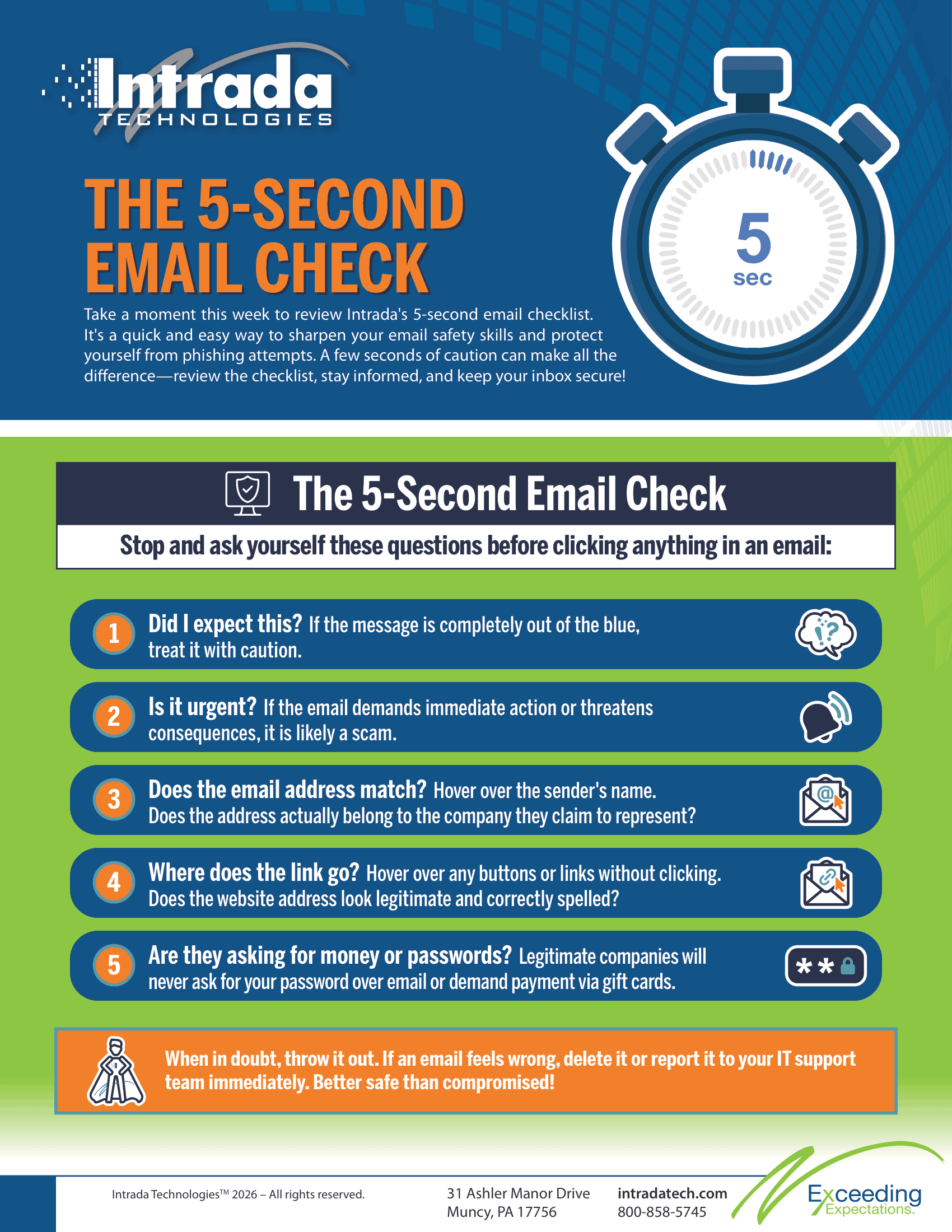
To help reinforce these habits, we have created a simple checklist you can download at the end of this article. You can copy this list, print it out, and hang it in your office or breakroom.

ABOUT THE AUTHOR
David Steele is the co-founder of Intrada Technologies, a full-service web development and network management company launched in 2000. David is responsible for developing and managing client and vendor relationships with a focus on delivering quality service. In addition, he provides project management oversight on all security, compliancy, strategy, development and network services.
Learn MoreArtificial intelligence is impacting every industry, but businesses in sectors like medical and manufacturing are experiencing especially rapid change. According to a 2024 Deloitte survey, 86% of manufacturing leaders anticipate increasing AI investments in the next year, while healthcare organizati...