Beyond MFA: Modern Identity Security with Microsoft Entra
Overview
Traditional network security models were built around protecting a physical office — firewalls, VPNs, and locked-down internal networks. That approach no longer fits how modern businesses operate. Today’s workforce is mobile, cloud-based, and increasingly reliant on SaaS applications, making identity the new frontline of security.
This article explains why identity-based security matters now, how Microsoft Entra (formerly Azure Active Directory) strengthens access control beyond Multi-Factor Authentication (MFA), and what small and mid-sized businesses can do to protect users, data, and applications in a modern environment.
What “Identity as the Perimeter” Really Means
In the past, security assumed users were trusted once they were “inside” the network. Today, users sign in from home offices, coffee shops, personal devices, and mobile phones — often accessing dozens of cloud applications.
Identity-based security flips the model.
Instead of trusting a location or network, systems continuously verify:
Who the user is
How they’re authenticating
What device they’re using
Where they’re signing in from
What they’re trying to access
Every access request is evaluated in real time.
Microsoft Entra is Microsoft’s identity and access management platform that enforces this modern approach across Microsoft 365, Azure, and thousands of third-party applications.
Why MFA
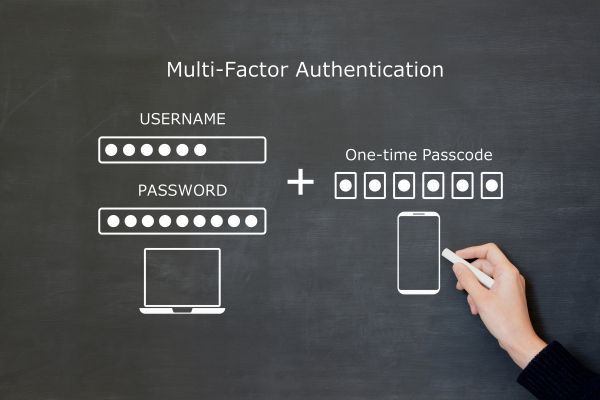
Multi-Factor Authentication (MFA) is a security enhancement that requires users to verify their identity using multiple credentials before gaining access to a system, application, or service. This layered approach to security helps ensure that the person requesting access is indeed who they claim to be, significantly reducing the risk of unauthorized access.
MFA generally involves a combination of two or more of the following factors:
Something you know: A password, PIN, or answer to a security question.
Something you have: A physical token, smart card, or a mobile phone to receive a verification code.
Something you are: Biometric identifiers, such as a fingerprint, facial recognition, or voice, that uniquely identify the user.
By requiring multiple forms of verification, MFA adds an additional layer of defense against potential threats, even if one factor (such as a password) becomes compromised. For instance, even if an attacker obtains a user's password, they would still need the second form of authentication to gain access.
In today's digital landscape, where cyber threats are increasingly sophisticated, implementing MFA is a critical step for organizations to protect sensitive data and systems. It enhances security for end-users and across the enterprise, making it a fundamental component of a robust cybersecurity strategy.
Alone Is No Longer Enough
Multi-Factor Authentication
Multi-Factor Authentication (MFA) is a security enhancement that requires users to verify their identity using multiple credentials before gaining access to a system, application, or service. This layered approach to security helps ensure that the person requesting access is indeed who they claim to be, significantly reducing the risk of unauthorized access.
MFA generally involves a combination of two or more of the following factors:
Something you know: A password, PIN, or answer to a security question.
Something you have: A physical token, smart card, or a mobile phone to receive a verification code.
Something you are: Biometric identifiers, such as a fingerprint, facial recognition, or voice, that uniquely identify the user.
By requiring multiple forms of verification, MFA adds an additional layer of defense against potential threats, even if one factor (such as a password) becomes compromised. For instance, even if an attacker obtains a user's password, they would still need the second form of authentication to gain access.
In today's digital landscape, where cyber threats are increasingly sophisticated, implementing MFA is a critical step for organizations to protect sensitive data and systems. It enhances security for end-users and across the enterprise, making it a fundamental component of a robust cybersecurity strategy.
is a critical (and still essential) security control, but it’s only the starting point.
Attackers have evolved. Modern phishing attacks can:
Steal MFA
Multi-Factor Authentication (MFA) is a security enhancement that requires users to verify their identity using multiple credentials before gaining access to a system, application, or service. This layered approach to security helps ensure that the person requesting access is indeed who they claim to be, significantly reducing the risk of unauthorized access.
MFA generally involves a combination of two or more of the following factors:
Something you know: A password, PIN, or answer to a security question.
Something you have: A physical token, smart card, or a mobile phone to receive a verification code.
Something you are: Biometric identifiers, such as a fingerprint, facial recognition, or voice, that uniquely identify the user.
By requiring multiple forms of verification, MFA adds an additional layer of defense against potential threats, even if one factor (such as a password) becomes compromised. For instance, even if an attacker obtains a user's password, they would still need the second form of authentication to gain access.
In today's digital landscape, where cyber threats are increasingly sophisticated, implementing MFA is a critical step for organizations to protect sensitive data and systems. It enhances security for end-users and across the enterprise, making it a fundamental component of a robust cybersecurity strategy.
tokens
Trick users into approving push notifications
Bypass basic MFA
Multi-Factor Authentication (MFA) is a security enhancement that requires users to verify their identity using multiple credentials before gaining access to a system, application, or service. This layered approach to security helps ensure that the person requesting access is indeed who they claim to be, significantly reducing the risk of unauthorized access.
MFA generally involves a combination of two or more of the following factors:
Something you know: A password, PIN, or answer to a security question.
Something you have: A physical token, smart card, or a mobile phone to receive a verification code.
Something you are: Biometric identifiers, such as a fingerprint, facial recognition, or voice, that uniquely identify the user.
By requiring multiple forms of verification, MFA adds an additional layer of defense against potential threats, even if one factor (such as a password) becomes compromised. For instance, even if an attacker obtains a user's password, they would still need the second form of authentication to gain access.
In today's digital landscape, where cyber threats are increasingly sophisticated, implementing MFA is a critical step for organizations to protect sensitive data and systems. It enhances security for end-users and across the enterprise, making it a fundamental component of a robust cybersecurity strategy.
through session hijacking
Relying solely on MFA
Multi-Factor Authentication (MFA) is a security enhancement that requires users to verify their identity using multiple credentials before gaining access to a system, application, or service. This layered approach to security helps ensure that the person requesting access is indeed who they claim to be, significantly reducing the risk of unauthorized access.
MFA generally involves a combination of two or more of the following factors:
Something you know: A password, PIN, or answer to a security question.
Something you have: A physical token, smart card, or a mobile phone to receive a verification code.
Something you are: Biometric identifiers, such as a fingerprint, facial recognition, or voice, that uniquely identify the user.
By requiring multiple forms of verification, MFA adds an additional layer of defense against potential threats, even if one factor (such as a password) becomes compromised. For instance, even if an attacker obtains a user's password, they would still need the second form of authentication to gain access.
In today's digital landscape, where cyber threats are increasingly sophisticated, implementing MFA is a critical step for organizations to protect sensitive data and systems. It enhances security for end-users and across the enterprise, making it a fundamental component of a robust cybersecurity strategy.
is like locking the front door but leaving the windows open.
Microsoft Entra builds on MFA
Multi-Factor Authentication (MFA) is a security enhancement that requires users to verify their identity using multiple credentials before gaining access to a system, application, or service. This layered approach to security helps ensure that the person requesting access is indeed who they claim to be, significantly reducing the risk of unauthorized access.
MFA generally involves a combination of two or more of the following factors:
Something you know: A password, PIN, or answer to a security question.
Something you have: A physical token, smart card, or a mobile phone to receive a verification code.
Something you are: Biometric identifiers, such as a fingerprint, facial recognition, or voice, that uniquely identify the user.
By requiring multiple forms of verification, MFA adds an additional layer of defense against potential threats, even if one factor (such as a password) becomes compromised. For instance, even if an attacker obtains a user's password, they would still need the second form of authentication to gain access.
In today's digital landscape, where cyber threats are increasingly sophisticated, implementing MFA is a critical step for organizations to protect sensitive data and systems. It enhances security for end-users and across the enterprise, making it a fundamental component of a robust cybersecurity strategy.
by adding context and intelligence to every login attempt, making access decisions far more secure.
Key Security Capabilities of Microsoft Entra
For small and mid-sized businesses, Microsoft Entra delivers enterprise-grade identity protection without enterprise complexity.
Conditional Access: Smart Security Policies
Conditional Access allows businesses to define when access is allowed and under what conditions.
For example:
Require MFA
Multi-Factor Authentication (MFA) is a security enhancement that requires users to verify their identity using multiple credentials before gaining access to a system, application, or service. This layered approach to security helps ensure that the person requesting access is indeed who they claim to be, significantly reducing the risk of unauthorized access.
MFA generally involves a combination of two or more of the following factors:
Something you know: A password, PIN, or answer to a security question.
Something you have: A physical token, smart card, or a mobile phone to receive a verification code.
Something you are: Biometric identifiers, such as a fingerprint, facial recognition, or voice, that uniquely identify the user.
By requiring multiple forms of verification, MFA adds an additional layer of defense against potential threats, even if one factor (such as a password) becomes compromised. For instance, even if an attacker obtains a user's password, they would still need the second form of authentication to gain access.
In today's digital landscape, where cyber threats are increasingly sophisticated, implementing MFA is a critical step for organizations to protect sensitive data and systems. It enhances security for end-users and across the enterprise, making it a fundamental component of a robust cybersecurity strategy.
only when users sign in from outside the office
Block logins from high-risk countries
Prevent access from unmanaged or outdated devices
Require compliant devices for sensitive applications
These policies reduce risk while minimizing disruption for legitimate users.
Identity Protection and Risk-Based Access
Microsoft Entra continuously analyzes sign-in behavior using Microsoft’s global threat intelligence.
If a login looks suspicious — unusual location, impossible travel, or known malicious IP
The Internet Protocol (IP) is a foundational communication protocol used for relaying packets of data across network boundaries. Structured as part of the Internet Protocol Suite, commonly known as TCP/IP, it is responsible for addressing and routing data so that it can travel across diverse interconnected networks and reach its intended destination. IP operates on the principles of packet-switching and is characterized by its use of unique IP addresses for each device connected to the network, ensuring that data packets are directed accurately.
There are currently two primary versions of Internet Protocol in use: IPv4 and IPv6. IPv4, employing a 32-bit address scheme, has been the predominant version since its inception, but its address space has nearly been exhausted. IPv6, introduced to overcome the limitations of IPv4, uses a 128-bit address scheme, significantly expanding the available address space to accommodate the growing number of internet-connected devices.
By facilitating the efficient and reliable transmission of data, the Internet Protocol underpins the functionality of the modern internet, enabling seamless communication and information sharing on a global scale. As network technologies continue to advance, the importance of robust and adaptable IP standards remains critical to the ongoing growth and evolution of digital connectivity.
— Entra can:
Prompt for additional verification
Limit access
Automatically block the sign-in
This proactive protection helps stop breaches before damage occurs.
Secure Access to Cloud and On-Prem Applications
Microsoft Entra provides a single identity platform for:
Microsoft 365
Azure-hosted resources
On-premises applications
Thousands of third-party SaaS tools
Users authenticate once and gain secure, policy-driven access across all systems — reducing password fatigue and IT overhead.
Zero Trust Alignment
Microsoft Entra supports a Zero Trust security model: Never trust, always verify.
Every access request is treated as potentially hostile until proven otherwise — regardless of where the user is located.
For SMBs, this means adopting modern security principles without needing a dedicated security team.
Common Identity Security Challenges for SMBs
While identity-based security is powerful, many small businesses struggle with implementation.
Overly Permissive Access
Users often accumulate access over time, creating unnecessary risk. Without regular review, former employees or compromised accounts may retain access longer than intended.
Lack of Visibility
Without centralized identity management, IT teams may not know:
Who has access to what
From which devices
Under what conditions
Microsoft Entra provides clear visibility and reporting to close these gaps.
Balancing Security and Usability
Security that’s too restrictive frustrates users. Identity-based controls allow businesses to apply stronger security only when risk is higher — improving both protection and user experience.
Building a Strong Identity Security Strategy
To make identity security effective, SMBs should focus on a few core principles:
Start with Identity Hygiene
Enforce MFA
Multi-Factor Authentication (MFA) is a security enhancement that requires users to verify their identity using multiple credentials before gaining access to a system, application, or service. This layered approach to security helps ensure that the person requesting access is indeed who they claim to be, significantly reducing the risk of unauthorized access.
MFA generally involves a combination of two or more of the following factors:
Something you know: A password, PIN, or answer to a security question.
Something you have: A physical token, smart card, or a mobile phone to receive a verification code.
Something you are: Biometric identifiers, such as a fingerprint, facial recognition, or voice, that uniquely identify the user.
By requiring multiple forms of verification, MFA adds an additional layer of defense against potential threats, even if one factor (such as a password) becomes compromised. For instance, even if an attacker obtains a user's password, they would still need the second form of authentication to gain access.
In today's digital landscape, where cyber threats are increasingly sophisticated, implementing MFA is a critical step for organizations to protect sensitive data and systems. It enhances security for end-users and across the enterprise, making it a fundamental component of a robust cybersecurity strategy.
for all users
Eliminate shared or generic accounts
Review and reduce excessive permissions
Implement Conditional Access Gradually
Start with high-risk scenarios and expand policies over time to avoid user disruption.
Secure Devices as Well as Users
Identity and device security go hand in hand. Enforcing device compliance ensures credentials aren’t used on compromised systems.
Monitor and Adjust
Identity security isn’t “set it and forget it.” Regular reviews help adapt to new threats and business changes.
How Can Intrada Help?
Microsoft Entra is a powerful platform — but its real value comes from proper configuration and ongoing management.
At Intrada Technologies, we help businesses:
Design and implement secure identity strategies
Configure Conditional Access and MFA
Multi-Factor Authentication (MFA) is a security enhancement that requires users to verify their identity using multiple credentials before gaining access to a system, application, or service. This layered approach to security helps ensure that the person requesting access is indeed who they claim to be, significantly reducing the risk of unauthorized access.
MFA generally involves a combination of two or more of the following factors:
Something you know: A password, PIN, or answer to a security question.
Something you have: A physical token, smart card, or a mobile phone to receive a verification code.
Something you are: Biometric identifiers, such as a fingerprint, facial recognition, or voice, that uniquely identify the user.
By requiring multiple forms of verification, MFA adds an additional layer of defense against potential threats, even if one factor (such as a password) becomes compromised. For instance, even if an attacker obtains a user's password, they would still need the second form of authentication to gain access.
In today's digital landscape, where cyber threats are increasingly sophisticated, implementing MFA is a critical step for organizations to protect sensitive data and systems. It enhances security for end-users and across the enterprise, making it a fundamental component of a robust cybersecurity strategy.
policies
Integrate cloud and on-premises applications
Monitor identity risks and respond proactively
We act as an extension of your IT team, ensuring your users can work securely — wherever business takes them.
Ready to move beyond basic MFA
Multi-Factor Authentication (MFA) is a security enhancement that requires users to verify their identity using multiple credentials before gaining access to a system, application, or service. This layered approach to security helps ensure that the person requesting access is indeed who they claim to be, significantly reducing the risk of unauthorized access.
MFA generally involves a combination of two or more of the following factors:
Something you know: A password, PIN, or answer to a security question.
Something you have: A physical token, smart card, or a mobile phone to receive a verification code.
Something you are: Biometric identifiers, such as a fingerprint, facial recognition, or voice, that uniquely identify the user.
By requiring multiple forms of verification, MFA adds an additional layer of defense against potential threats, even if one factor (such as a password) becomes compromised. For instance, even if an attacker obtains a user's password, they would still need the second form of authentication to gain access.
In today's digital landscape, where cyber threats are increasingly sophisticated, implementing MFA is a critical step for organizations to protect sensitive data and systems. It enhances security for end-users and across the enterprise, making it a fundamental component of a robust cybersecurity strategy.
and protect your business at the identity level?
Contact Intrada Technologies to strengthen your security foundation with Microsoft Entra.
ABOUT THE AUTHOR
Allison Reichenbach is a dedicated and skilled Account Manager with a strong foundation in technology, client relations, and strategic problem‑solving. With experience supporting clients in the managed services industry, Allison excels at understanding business needs, coordinating effective IT solutions, and ensuring every client receives exceptional service and support.
Digital marketing is full of acronyms. SEO, SEM, PPC, CTR—the list goes on. Just when you think you have a handle on the terminology, a new one appears. Enter AIO, or Artificial Intelligence Optimization. It’s a term that is appearing more frequently in strategy meetings and industry reports, yet ma...
Most cyberattacks today don’t start with advanced hacking techniques — they begin with stolen credentials. Once attackers gain access, they move quickly through cloud applications, email, and shared files.Conditional Access helps stop these threats by evaluating context, not just passwords, before a...